TL;DR Summary:
For creating a LinkedIn page, log into your LinkedIn account and create your company page using your official business details, i.e., name, URL, logo, and a short tagline that captures what you do. Add a friendly, to-the-point description that tells people who you are, what you offer, and why it matters.
Once your page is live, use keywords, a good banner image, and regular posts to make it discoverable and engaging.
Introduction:
When Priya launched her design studio she relied only on Instagram.
A potential client asked, “Do you have a LinkedIn page?”
She didn’t and she lost it.
She ran a few Google searches and came to this:
“If your business isn’t on LinkedIn it is almost invisible to half the professional world. Over 67 million companies use LinkedIn and complete Pages get 30 percent more weekly views. Whether you are a startup or a growing firm, a company page adds credibility and a professional identity.”
So, do you own a company and have a LinkedIn page for it?
Creating a LinkedIn Page for Your Company
These days, most businesses and working professionals know about LinkedIn. Yet, many still use it only to hire someone or look for a job.
The data above shows how powerful LinkedIn can be through Priya’s chat with her potential client.
You wouldn’t want to lose a client the way Priya did, right? Let’s make sure that doesn’t happen.
Let’s walk you through the steps to build a strong LinkedIn page.
Step 1: Sign in to LinkedIn
Well, when you walk into a client’s office, what’s the first thing you notice?
The nameplate, the vibe, and how everything feels professional, right?
That’s exactly what your LinkedIn Company Page does. It’s your brand’s first impression. This step is like unlocking the front door to your brand’s digital office.
You’ll need a personal LinkedIn account to get started. Log in and make sure you’re using your company email address.
Now, follow these quick steps:
- Go to the LinkedIn homepage.
- Click on the Work icon at the top right corner.
- Select Create a Company Page from the dropdown.
LinkedIn will then ask you to choose the type of page you want to create.
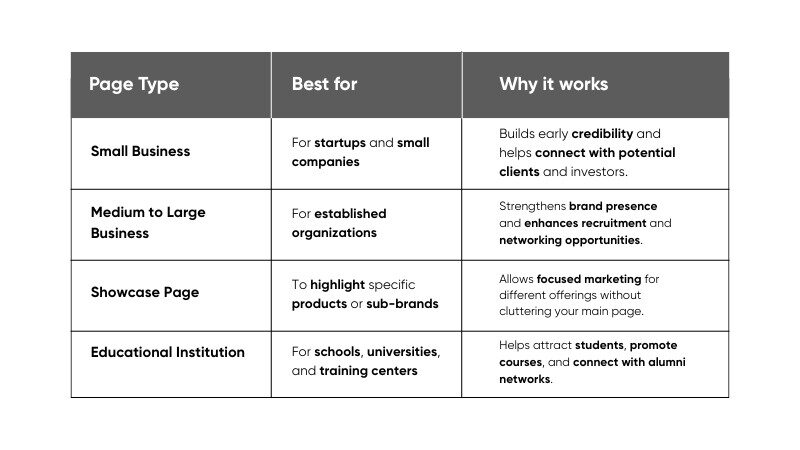
Step 2: Enter Your Company Details
Now that you’ve opened the doors to your digital office, it’s time to decorate the space.
This is where your brand truly comes to life on LinkedIn. Every detail adds to your digital identity.
Here’s what to fill in:
- Company Name: Use your official name that matches other social media profiles.
- Public URL: Choose a clean LinkedIn URL (for example, linkedin.com/company/yourcompanyname).
- Website: Add your official website link.
- Industry and Size: Select your industry type and company size to help LinkedIn recommend relevant audiences.
- Logo and Tagline: Add a logo with a clear background and consistent aspect ratio (400x400px works best). Avoid busy backgrounds. Your tagline should include one keyword your customers would search for on LinkedIn, not just your slogan.
Do’s and Don’ts:
- Do keep your brand name and visuals consistent across all platforms.
- Don’t use blurry logos or generic taglines. First impressions matter.
Step 3: Add a Compelling Company Description
Your company description can be your elevator pitch. It’s what convinces someone in just a few seconds that your brand is worth their time. It tells people who you are, what you do, and why you matter.
Here’s a quick structure you can follow:
- Start with your company’s mission and values.
- Highlight your main products or services.
- Include what makes you stand out.
- End with a call to action (for example, “Visit our website to learn more”).
Let’s take an example you’ll instantly recognize. Zomato.
The brand is everywhere, on Instagram, LinkedIn, billboards, and even right outside your door delivering food. Their online presence is bold, fun, and instantly recognizable.
What truly sets Zomato apart on LinkedIn is how it blends purpose with personality. Their description clearly shares their mission of bringing better food to more people while telling real stories of impact.
They don’t just talk about what they do. They show it through their actions, from supporting communities during the pandemic to promoting sustainability in their deliveries.
This storytelling approach makes Zomato feel human and relatable. It helps people connect emotionally while understanding the values that drive the brand forward.
Step 4: Optimize Your Page for Search
You’ve built your LinkedIn page, but here’s the thing. What good is a great page if no one can find it?
Did you know LinkedIn drives nearly 80% of all social media leads for B2B companies. That means visibility is not optional. It is essential.
Take HubSpot for example. Their LinkedIn page is a masterclass in search optimization. Their tagline uses strong keywords like marketing, sales, and customer success. Their About section clearly defines what they do and who they help. They also link their website, blogs, and learning resources, making it easy for visitors to explore more. Even their employees list HubSpot as their workplace, which boosts their visibility further.
Here’s how you can do the same:
- Use relevant keywords in your About section and tagline so the right audience can find you easily.
- Add links to your website, blogs, and other platforms. This builds trust and gives your audience more ways to connect with you.
- Encourage your employees to list your company as their workplace. Every profile that mentions your company adds more visibility.
Step 5: Add a Banner and Visual Identity
Your banner image is your visual handshake that says, “Hey, this is who we are!”
A generic stock photo doesn’t build recall. Use your banner to show your brand’s personality. It could be a photo of your team in action, your workspace, or your flagship product. Whatever you choose, make sure it feels authentic to your brand.
Recommended dimensions: 1128 x 191 pixels
Pro Tip: Keep your visuals fresh. Update your banner every few months to reflect what’s new and exciting in your brand’s journey.
Step 6: Post Regular and Relevant Content
A LinkedIn page without content is like a store with its shutters down. People might stop by once, but they won’t stay for long. Posting consistently builds visibility, trust, and credibility.
Content is what gives your page its voice and keeps your audience coming back. It helps you share updates, celebrate achievements, and join conversations that matter to your industry.
Take Adobe’s LinkedIn page for example. They don’t just promote their products. They share creative tips, highlight employee stories, and engage with trends that inspire their community. This balance of value and authenticity keeps their audience connected and loyal.
Here are some ideas to get started.
- Share insights, blogs, and company news.
- Celebrate milestones and employee achievements.
- Repost customer testimonials or partner highlights.
- Join conversations around trending topics in your industry.
Pro Tip: Try different formats. Videos, carousels, infographics, and polls perform well on LinkedIn and keep your content engaging.
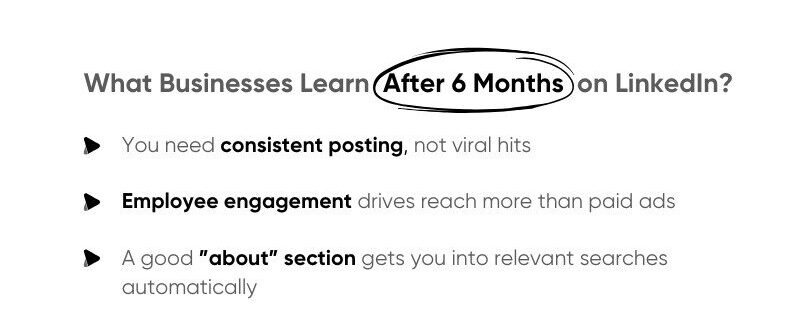
Posting great content is just the beginning. The real growth happens when you start engaging. LinkedIn is not a place to just post and leave. It is a space to talk, listen, and connect with people who matter to your brand.
So, don’t just post and vanish. Reply to comments, thank your followers, and join conversations that align with your values. Each interaction adds personality and builds trust in your brand.
Now let’s talk about your LinkedIn Page Analytics. This is where you understand how your efforts are performing. Here’s what to track:
- Visitor demographics to learn who is viewing your page.
- Post impressions and engagement rate to find out what content performs best.
- Follower growth over time to measure your consistency and reach.
Conclusion
With this, we come to the end of the blog. Summing it up, we explored what a LinkedIn Company Page is and why it is essential for your brand. We also discussed who should create it, where it helps you grow, when to start building it, and how to set it up step by step.
From creating your page to optimizing, posting, and engaging, each step helps shape your brand’s professional identity and visibility.
About The Wise Idiot
We’re The Wise Idiot, and yes, that’s really our name. We’re a content marketing agency that’s been helping startups and growing brands tell their stories since 2017.
Here’s what we do: we take the stuff that makes your business special and turn it into content that actually works. Whether that’s writing that doesn’t put people to sleep, websites that make visitors stick around, or social media that gets people talking, we handle it all.
FAQs
- Do I need a personal LinkedIn account to create a company page?
Yes. You must have a personal LinkedIn account with your company email address to create and manage your company page. - How much does it cost to create a LinkedIn Company Page?
It’s completely free to set up a company page. You’ll only spend if you choose to run paid promotions or ads later. - What are the benefits of having a LinkedIn Company Page?
A LinkedIn Company Page helps you build credibility, attract talent, increase brand visibility, and connect with potential clients or partners. - How often should I post on my LinkedIn Company Page?
Aim for 2–4 posts per week to stay consistent and visible. Regular posting helps you reach more professionals and grow your audience organically. - How can I measure the performance of my LinkedIn Company Page?
Use LinkedIn Page Analytics to track engagement, impressions, follower growth, and audience demographics to see what’s working.