
| TL;DR
A schema is the logical structure that defines how data is organized in a database. It makes your content easier for search engines and AI systems to understand, extract, and trust. If you’re not using schema, you’re relying on AI to guess what your content means. If you are using it, you’re defining that meaning yourself.a Start with three types:
|
Your competitors are creating great content. So are you. But one of you is showing up in AI Overviews, rich snippets, and ChatGPT citations, while the other is not. The difference, increasingly, comes down to a few hundred lines of JSON that most B2B marketing teams have never looked at.
Schema markup is still one of the most under-deployed tools in B2B SEO. Most websites don’t have much of it, and that’s the opportunity. While your competitors are busy debating content calendars, you can wire your site directly into the machine-readable layer of the web and become the source that search engines and AI platforms reach for first.
This is your strategy guide for doing exactly that.
What is schema markup?
Schema markup is structured code (specifically a vocabulary of tags defined at schema.org) that you embed in your website’s HTML to tell search engines and AI platforms what your content means. Without it, search engines infer context. With it, you define it.
Here’s the simplest way to think about it: if your page says “Founded in 2012, serving enterprise clients in 14 countries,” a crawler doesn’t automatically know whether that’s a boast, a fact, or a footnote. Schema markup makes it less ambiguous. You’re saying: this is our founding date, these are the regions we serve, this is our company type.
| Note: Schema markup is not a direct ranking factor. Google has said so repeatedly. However, according to Google’s own documentation, structured data helps search engines better understand page content and enables enhanced search results. |
Why schema matters in AI search
AI systems like Google’s AI Overviews, ChatGPT, Claude, and Gemini don’t just crawl pages. They extract meaning, identify entities, and assemble answers. In that process, structured clarity matters.
Schema markup helps in three ways:
- It reduces ambiguity. AI doesn’t have to guess what your page is about.
- It improves extractability. Your content is easier to break into usable pieces.
- It increases trust signals. Clearly defined data is easier to validate and reuse.
This doesn’t mean schema guarantees visibility in AI search results. But it improves how well your content can be interpreted, which is a prerequisite for being surfaced.
The three schema types that impact B2B websites
There are 823 schema types. For most B2B companies, you need to focus on three to start, the ones that combine the highest impact with the fastest implementation.
1. FAQ Schema
FAQ schema (technically FAQPage schema) explicitly marks up question-and-answer content on your pages so that search engines and AI platforms can extract, display, and cite those answers directly.
Here’s something counterintuitive that confuses a lot of B2B content teams: Google restricted FAQ rich results to government and health sites in August 2023, reducing visible FAQ snippets for most businesses.
However, the FAQ schema remains critical for featured snippets, voice search, and especially AI search platforms like ChatGPT and Perplexity, which rely heavily on structured FAQ data for citations.
The schema became more important for generative engine optimization even as it became less visible in traditional SERPs.
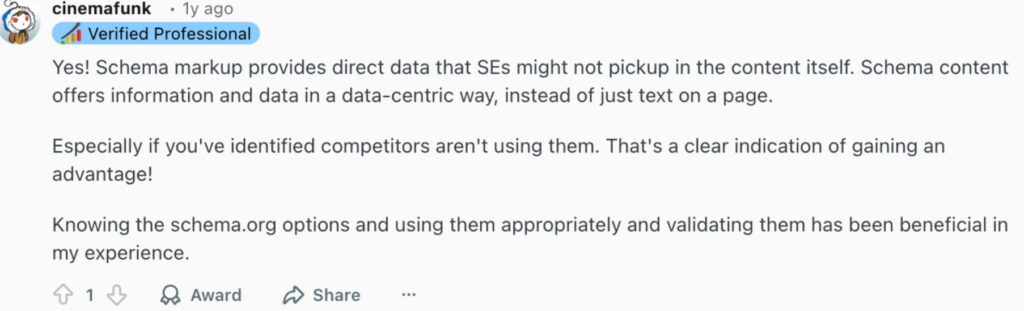
A Reddit user who ran a schema vs. no-schema test on TechSEO reiterates that FAQ/QAPage schema structures content in a way AI systems can easily use. Even if page content is messy, well-defined JSON-LD helps AI pull the correct information, showing that structured data strongly influences what gets retrieved and trusted.
Here are some good rules to keep in mind when implementing FAQ schema:
- Write questions the way your buyers actually ask them, conversational and complete. “How does [your product] integrate with Salesforce?” beats “Salesforce integration.”
- Keep answers between 40 and 80 words. Too short (under 30 words) lacks substance. Too long (over 80 words) becomes difficult for AI to extract as a single unit and harder for your buyer to scan.
- Match your H3 headings in the visible page content to the “name” property in your schema exactly. This lets AI platforms cross-verify that your markup actually reflects your content.
- Deploy on every service page and every pillar blog post; these are where buyers ask evaluative questions.
- Never add FAQ schema to pages without visible FAQ content. Google will penalize it.
Here’s an example of an FAQ schema:
| {
“@context”: “https://schema.org”, “@type”: “FAQPage”, “mainEntity”: [{ “@type”: “Question”, “name”: “What is schema markup?”, “acceptedAnswer”: { “@type”: “Answer”, “text”: “Schema markup is structured data that helps search engines understand content.” } }] } |
2. Article Schema
Article schema (specifically BlogPosting or Article) marks up your written content with structured metadata: author name, publication date, organization, and topic. It’s how AI platforms decide whether to trust and cite a piece of content.
A blog post with BlogPosting schema and FAQ schema gets cited in Google’s AI Overview for queries like “best RevOps tools for SaaS companies.”
Without it, even a well-written post can get overlooked because the AI can’t easily verify the author, the organization behind it, or how recently it was published.
Key implementation rules:
- Always include author (linked to a Person schema), datePublished, dateModified, and publisher (linked to your Organization schema)
- Use @id attributes to connect your Article schema to your Organization schema. For AI search, the more useful pattern is to connect nodes into a coherent graph using @id, so platforms understand the relationships between your content, your authors, and your brand
- Update date is modified every time you meaningfully refresh a post; freshness signals matter for AI citation preference
- Apply it to every blog post and resource page without exception
Here’s a simple example of an Article schema:
| {
“@context”: “https://schema.org”, “@type”: “Article”, “headline”: “The Schema Strategy for B2B”, “author”: { “@type”: “Person”, “name”: “Your Name” }, “datePublished”: “2026-01-01” } |
3. Organization Schema
This is the one most B2B teams skip entirely, and it’s arguably the most strategically important.
Organization schema, deployed sitewide, introduces your company to every search engine and AI platform that crawls your site. It establishes your brand as a known entity (a distinct, trusted thing in the machine’s knowledge graph) rather than a collection of web pages.
In fact, an AccuraCast study analyzing over 2,000 prompts across ChatGPT, Google AI Overviews, and Perplexity found that 81% of web pages receiving citations included schema markup.
Even Microsoft’s Fabrice Canel, Principal Product Manager at Bing, confirmed at SMX Munich in March 2025 that schema markup directly helps Microsoft’s large language models understand web content — one of the first official confirmations from a major AI platform.
For the query “What are the best B2B customer support platforms?” Plain’s website appears first in GPT results.
Example of an organization schema:
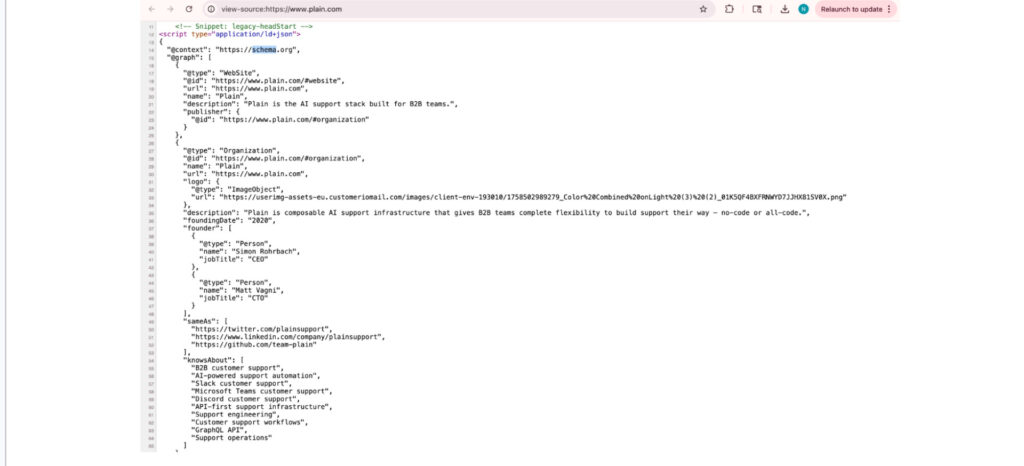
What your organization’s schema must include:
- name, url, logo, description
- sameAs — your LinkedIn, Crunchbase, and Wikipedia pages if you have them (this connects your schema to authoritative third-party sources AI systems already trust)
- foundingDate, areaServed, contactPoint
Then link everything together. Your Person schemas (key team members, authors) should reference the Organization. Your Service schemas should reference the Organization. Your Article schemas should reference both.
Authoritative third-party resources like Wikidata and Crunchbase also influence knowledge Graph visibility. These sources and your structured data plan together create your digital footprint and reinforce your brand authority.
How to roll out schema for your website?
Don’t try to implement everything at once. Here’s the sequenced approach that gets you results fastest:
Week 1–2: Foundation Deploy Organization schema sitewide via JSON-LD in your site’s global <head> template. Every page crawled from this point forward is associated with a known, structured entity.
Week 3–4: Service Pages Add Service schema to every core service or solution page. Include serviceType, provider (linked to your Organization), areaServed, and a short description. This is what allows AI search engines to understand what you actually do.
Month 2: Content Layer Roll out BlogPosting / Article schema across your entire blog. Set up a template so every new post automatically inherits the right markup. Add a Person schema for your authors and connect them to the Organization.
Month 2–3: FAQ Layer Audit your top 20 service pages and blog posts by organic traffic. For each one:
- Identify 4–6 questions buyers actually ask (use Google’s People Also Ask, your Search Console queries, and your sales team’s FAQ list)
- Write 50-word answers for each
- Add them to the visible page content first
- Then mark them up with the FAQPage schema
Ongoing: Test and Monitor
- Validate every new implementation with Google’s Rich Results Test before it goes live
- Monitor the Enhancements section of Google Search Console for errors
- Test your key pages and document what schema exists, what’s broken, and what’s missing
- Update the schema whenever you change page content, add services, or refresh old posts
The mistakes that harm your schema strategy
Getting the schema wrong can actively hurt your search visibility. These are the mistakes that show up most often in B2B audits:
- Marking up content that isn’t on the page. Google’s guidelines are explicit: schema must reflect visible content. Claiming 5-star ratings in schema when you show 4.2 stars on the page is a direct violation.
- Siloed schema with no entity connections. An organization schema that isn’t linked to service pages or author profiles means AI can’t form a coherent picture of your brand. Inconsistent schema types across pages create mixed signals, AI loses confidence, and cites someone else instead.
- Applying the same schema to every page regardless of type. A contact page is not an Article. A blog post is not a Service. Plugins that apply the same markup to every page regardless of content type send bad signals.
- Ignoring schema after deployment. Old addresses, discontinued products, and former employees in your schema erode the trust signals you’ve spent time building.
- Marking conflicting types on the same entity. Marking your company as both “Organization” and “LocalBusiness” with conflicting data confuses crawlers and can invalidate both.
How to validate and test schema
Implementing schema is only half the job. You need to make sure it’s accurate, error-free, and actually being picked up.
- Check eligibility: Use Google’s Rich Results Test to see if your schema qualifies for enhanced results and is parsed correctly.
- Validate structure: Run your pages through the Schema Markup Validator to catch syntax issues, missing fields, or incorrect types.
- Monitor performance: In Google Search Console, go to the Enhancements section to track errors, warnings, and which pages are being recognized.
- Keep it aligned: Your schema must match visible page content exactly. If it doesn’t, it can be ignored or weaken trust signals.
Treat this as an ongoing process. Every time you update content, your schema should reflect it.
Where schema fits in the future of search
Most B2B teams still treat SEO in 2026 as a content problem: publish more, update more, optimize more. But as search shifts toward AI-generated answers, the constraint is no longer just content quality. It’s how clearly that content can be understood, validated, and reused.
That’s where schema changes the game.
It gives your content structure, your brand definition, and your pages context that machines don’t have to infer. And in a system where AI decides what gets surfaced, that clarity becomes a competitive advantage.
The opportunity right now is simple. Very few companies are doing this well.
If you implement schema thoughtfully and connect it across your site, you’re not just improving SEO. You’re making your content usable in the environments where search is heading.
Frequently asked questions
Q1. What are the most important schema types for B2B websites?
Focus on FAQPage, Product/Services, Article (or BlogPosting), and Organization schema. These cover extractability, credibility, and entity recognition.
Q2. Does schema markup improve rankings?
Not directly, but it helps search engines and AI systems understand your content better, which can improve visibility and click-through rates.
Q3. How long does it take to see results from schema markup?
Typically, a few weeks to a couple of months, depending on crawl frequency and how consistently it’s implemented.